Dynamic websitesDynamic catalog websiteCATALOG

Dlatot HaMoshav

Dynamic catalog website for a custom door manufacturer

A visual catalog that organizes categories, models, and media around product inquiries.

Desktop architectural projects category for entrance doors
Mobile architectural projects category for entrance doors
Dynamic category · desktopDynamic category · mobile

CATALOG / FOUNDATION

Content model and relationships

See how content connects to the workflow behind the site.

For brands and manufacturers managing products, categories, and specifications.

A map of the public content model, not a capture of the private CMS.

Entities

  • 01Domain
  • 02Category
  • 03Subcategory
  • 04Model or project
  • 05Media
  • 06Contextual inquiry

Relationships

  • Domain

    contains · Category

  • Category

    organizes · Subcategory

  • Subcategory

    classifies · Model or project

  • Model or project

    is presented through · Media

  • Model or project

    leads to · Contextual inquiry

Management and publishing workflow

  1. 01

    Define a catalog item

    Each model is stored as one content unit with consistent fields.

  2. 02

    Assign the hierarchy

    The taxonomy determines where each model appears.

  3. 03

    Attach the media

    Each image is connected to the right model and view.

  4. 04

    Publish a dynamic page

    One template creates the page, route, and relationships.

  5. 05

    Preserve inquiry context

    The inquiry stays connected to the model the visitor viewed.

PROBLEM · SOLUTION

The decision behind the product

Problem
A large image catalog can become slow, hard to scan, and detached from inquiries.
Solution
Categories, models, and galleries were connected to one product-specific inquiry flow.
Goal
Help visitors find a model and inquire about that exact product.
Outcome
Visitors can find a model and inquire about it directly.
Uni.Mi's role
Content strategy, information architecture, UX, development, performance, and technical SEO

IMPLEMENTATION

What was built

The parts built to make the solution work.

  • 01Layered category architecture
  • 02Dynamic product and project views
  • 03Responsive media system
  • 04Contextual inquiry path
  • 05Technical SEO and measurement

THE OUTPUT

The working output

Screens show the product across desktop and mobile.

Mobile project-page flow on the Dlatot HaMoshav website
Project flow · mobile

EVIDENCE

What the output proves

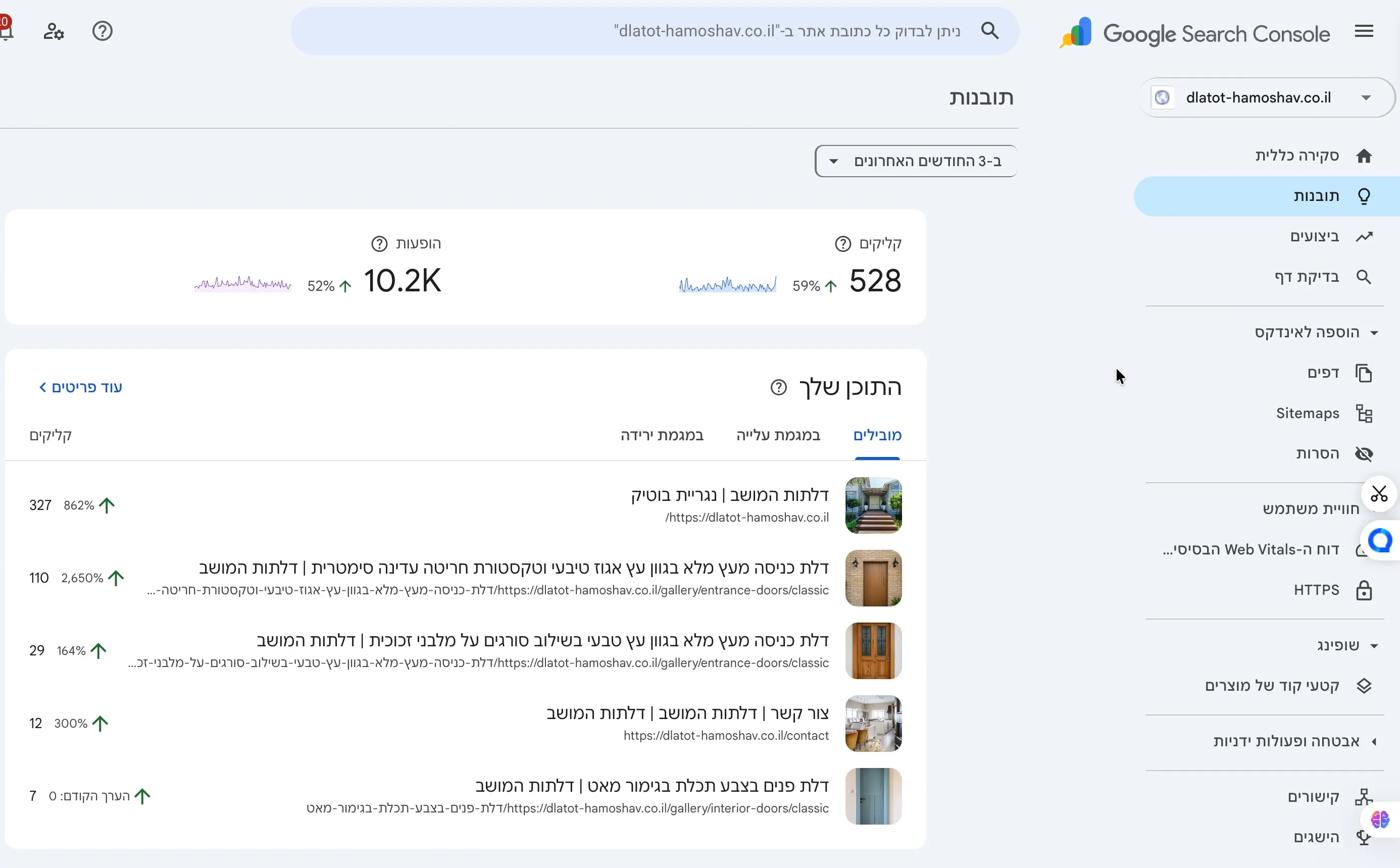
Dlatot HaMoshav Search Console capture showing 528 clicks and 10.2 thousand impressions across a three-month window
Approved source capture · three-month window

Structure

Layered catalog

Categories, galleries, and model pages connect to one inquiry journey.

Evidence

528 clicks · 10.2K impressions

The source capture shows the live property's performance across the previous three months at the time of capture.

Interface

Mobile first

Media and navigation remain legible on narrow screens.

CAPABILITIES

ניהול מדיהקטלוג דינאמיSEOמדידה

TECHNOLOGIES

Next.jsCloudinaryVercel

NEXT PROJECT

What should you build next?

Choose a website, landing page, or system and define a focused first version.